It turns out then, when trying to bootstrap a Ruby on Rails application after pulling it down from a repository, it is really important to set up a database for the application before you try to start it. Yes, like a pony and pony food, any web application needs a database to function properly. Before you start, run
rake db:create
and
rake db:migrate
The create command will create a new MySQL database on your local machine, unless you specify otherwise. The migrate command will configure the database with all the tables and relationships that are needed for it to work properly. The configuration instructions are in the applications model and migration files.
That way, everybody is happy and you don’t look like a complete noob in front of half the development team for two weeks. Not that, uh, that has ever happened to me.
UIAutomation is a new plugin, previewed at WWDC, that will be in the version of Instruments shipping with the iOS 4 SDK. Essentially it allows scriptable testing of the UI. This is one of the few (if any) instances of Apple supporting Behavior Driven Development (BDD) in their developer programs and it is very exciting.
If you have spent any amount of time with BDD in Ruby on Rails, this should be familiar to you. If not, here are the basics. As the developer builds out new features or modifies existing ones, he or she can create simple test scripts that will be read and parsed to create a virtual interface for the application that will only be seen by the testing software. Here, it is Instruments. In Ruby on Rails, it is Cucumber.
UIAutomation makes use of JavaScript-based scripts to describe what the test should do and what it should be testing for. Unlike Cucumber, which runs in an invisible, virtual browser, UIAutomation will actually run on a development device and operate the application on the screen, for the developer to see. The team at Apple that created this plugin has come up with a way to describe UI elements and features on the screen in JavaScript.
The script will run through the tests that are specified and, as it runs, it will deliver a running report of what has happened so far. When it is done, the developer can save the results of the test session.
As someone who spent most of his summer in 2009 writing Cucumber scripts and wading neck-deep in BDD, it is a little exciting to see this kind of testing coming to the iPhone. Hopefully, it will be available for Mac development, as well. When I have the new development tools in my hands, I will give you a more detailed tutorial.
One of the most highly anticipated features of Apple’s iOS 4 is the ability to temporarily push an application’s processes to the background while another application is brought to the foreground and used. This was covered in detail at WWDC earlier this month. Fortunately, Apple was generous enough to provide videos from the conference on its iPhone developer site.
Main types of multitasking app
There are three types of multitasking app, detailed in the UIBackgroundModes key.
- Audio (This would be for an application like Pandora and would allow it continue playing music outside of the application, similar to the iPod app.)
- Location (This would monitor the phone’s position via CoreLocation and perform tasks according to the developer’s code.)
- VoIP (This would include applications like Skype and allow them to function like Apple’s “Phone” app.)
Application lifecycle
There are three states in a multitasking app’s lifecycle, Active, Inactive, and Background.
typedef enum {

   UIApplicationStateActive,

   UIApplicationStateInactive,

   UIApplicationStateBackground

} UIApplicationState;
When the application launches, it calls the following methods from the app delegate:
-(void) application:(UIApplication *)application    didFinishLaunchingWithOptions:(NSDictionary *)launchOptions;

-(void) applicationDidBecomeActive:(UIApplication *)application;
When the app goes to the background, we will execute the following the app delegate:
-(void) applicationWillResignActive:(UIApplication *)application;

-(void) applicationDidEnterBackground:(UIApplication *)application;
When an app is pushed to the background, it operations are suspended, save for the the functions that are desired to run in the background. For example, you would want Pandora to keep playing music and occasionally retrieve more music. You would want Skype to continue taking input from the microphone, sending output to the speaker, and remaining in contact with Skype’s servers. It is primarily the GUI-related functionality that is suspended when an app is pushed to the background.
Killing apps
Now, the iOS is not merciless when it comes to killing app processes. An app is given some time to clean up any processes that are not intended to run in the background. There, its state is sitting in volatile memory.
Because paging memory to the disk is not allowed, if system resources are needed for an active application, any background application can be killed by the OS. When it is killed, it is again given some time to clean up. For example, an app might need to finish a download or safely disconnect from a server. This can be done with the following methods:
-(UIBackgroundTaskIdentifier)

   beginBackgroundTaskWithExpirationHandler:(void(^)(void))handler;

-(void) endBackgroundTask:(UIBackgroundTaskIdentifier)identifier;
The first line of that code will tell the application delegate to move the app to background status along with some instructions on how to handle being terminated while there. The method endBackgroundTask: essentially kills the background task it is given as an argument.
Closing remarks
So, that’s about it. Apple seems to have come up with a system for background processes that is pretty straightforward. The OS will decide for you if and when a background app is to be terminated. It takes only a few lines of code to get started with this stuff. Apple has posted the video of this talk, along with the slides. (It is in the video “Session 101 – What’s New in Cocoa Touch.”) All of the code that you see here came from that talk. I hope all this was helpful.
I know that this has been done to death, but I felt that I should persist in beating a deceased horse. When I am at work and don’t want it to be obvious that I am on Twitter, I use this nifty little Terminal trick that lets me send out tweets. On my laptop, I took it a step further and wrote a command-line Ruby script that does that and more.
Here are the basics of posting to Twitter through the Terminal. Somewhere on your computer, create a new shell script file. In my case, I will call it twitter.sh. Type this into the new file:
#!/bin/bash

curl -u username:password -d status="$1" http://twitter.com/statuses/update.xml

echo Message sent.
Now it is as simple as running a shell command with your message attached.
./twitter.sh "Hey, I am screwing around at work!"
It is as simple as that. You can create shortcuts that make using this even easier. The most common thing I do when I write this script is to alter the .bash_profile file to save myself the trouble of typing out ./twitter.sh.
Open a new terminal window (or tab) and enter “nano .bash_profile”. (It is not necessary that you use nano, I just prefer it for quick text editing in the Terminal.) Add the following to a new line to the file with the path in quotes being the path to your twitter.sh file and save.
alias tw="~/path/to/twitter.sh"
Now close that Terminal tab and open a new one. That is the only way to get the newly edited .bash_profile to load and your new alias to take effect. To send a message use your alias in place of ./twitter.sh.
tw "I am screwing around at work more efficiently!"
You’re welcome.
News broke on Ars Technica, among other fine tech news sources, that several wireless carriers announced at the Mobile World Congress in Barcelona that they are coming together to create their own, unified, somewhat open mobile application store that will provide third-party software to people using their networks. Among this group of carriers is Vodafone, Verizon, Sprint, China Mobile, Orange, and AT&T. Handset manufacturers LG, Samsung, and Sony Ericsson are also getting in on this deal, presumably because their hardware will be running these applications.
Several of these carriers are already carriers for the iPhone in their respective markets. They claim that this store is not meant to compete head-on with Apple’s App Store directly, but to simply offer third-party software to everyone who does not own a iPhone, BlackBerry, or Android OS smartphone. Apple does not make much money on the App Store, with most of its money coming from hardware sales driven by Apple’s 140,000-application store.
The carriers do not care about Apple’s sales. To them, Apple is just another hardware manufacturer that they do not have a problem slighting in order to increase their own revenue.
It does not seem likely that Apple will allow applications from this other store to run on their phones, opting to retain their locked-down walled garden of applications custom-built for the iPhone OS and interface. It will be interesting, however, how the presence of an application store that will support LG, Samsung, and Ericsson phones will affect sales of the iPhone or even Android-enabled phones.
On Justin.tv, and countless other sites, there is advertising. This is nothing new. Since almost the beginning of the web’s use by the common public, advertising has had a presence and has faithfully generated revenue for those sites so that they can stay up. This has created something of a meritocracy, where the sites with more traffic earn for money.
However, there is a phenomenon that has reared its ugly head and that is offering for-pay, premium accounts that lack advertising. Initially, I simply justified this as the site’s owners getting their income from another source, the user, rather than another organization buying space. On a recent episode of MacBreak Weekly, Merlin Mann stated that he felt paid, advertising free accounts were an abuse of the users and the advertisers. This was such a revelation to me that I felt it was worthy of a blog post.
Essentially, a site with advertising regards ads as a nuisance and a means to get money out of their regular users. They therefore are deliberately trying to annoy their users in order to elicit money from them. This has the added effect of treating advertisers as not partners, but tools for creating annoying, useless content. It also makes users despise ads and click through them, rather than pay attention to them.
Justin.tv does this and it is an abhorrent web design practice. It disrespects users and advertisers who choose to support the site in question. Any site that charges users money to make ads go away deserves neither money nor users. Speak up about this practice to any site admin that does this.
If you are reading this, then you are on a computer or smartphone. Either of these devices will need software to be useful hardware. Do not ever take for granted the community of developers that creates software for the hardware platforms that you use on a daily basis.
I understand that there is a group of people who jailbreak their iPhones and iPod touches simply so they can put stolen iPhone applications on them. This makes me want to hit each of them in the face with a hammer. If someone charges a price for their software, then it is usually a fair price. Most of the paid iPhone apps are 99 cents. What exactly is the mechanism in your mind that would make you think that you simply cannot part with a dollar after spending at least $200 on the device it will run on?
Software developers should not be taken advantage of. They, like the rest of humanity, need to eat and live indoors. In order to do this, they require a steady flow of income from people who purchase and use their software. If they can no longer afford to do this, they will simply stop developing cool, useful software and everyone will suffer.
Much of the convenience we take for granted in our daily lives is built on the backs of people staring at glowing rectangles, spooling out reams and reams of code. They provide a vital service. If you steal indie-produced software, you are not stealing from some bi, faceless corporation. You are most likely stealing from the developer himself.
Don’t be a prick. Don’t steal software.
I am in the in the process of developing my first App Store-ready iPhone application. One of the most critical things that anyone can do in the development process (on any platform) is to do thorough paper prototypes. However, paper prototyping carries with it a renewed importance on mobile devices due to the small screen sizes.
The iPhone and iPod touch screens are 320 x 480 pixels. Having an life-size sketch of what each interface in your application is going to look like will help you avoid designing an application whose interface is too large for its display.
There are many iPhone stencils and other design tools available. There is the Mobile Sketchbook , originally produced by Dean Kaplan of Kapsoft. The new version of the sketch book includes 1.5x life size blank iPhone screens to draw the interface on. It also includes a plastic stencil with various interface elements, set at the same 1.5x scale.
There is a metal stencil available. It has a 1.2x scale, relative to the actual screen size.
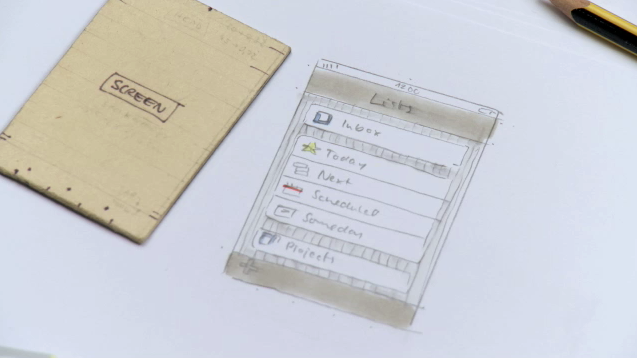
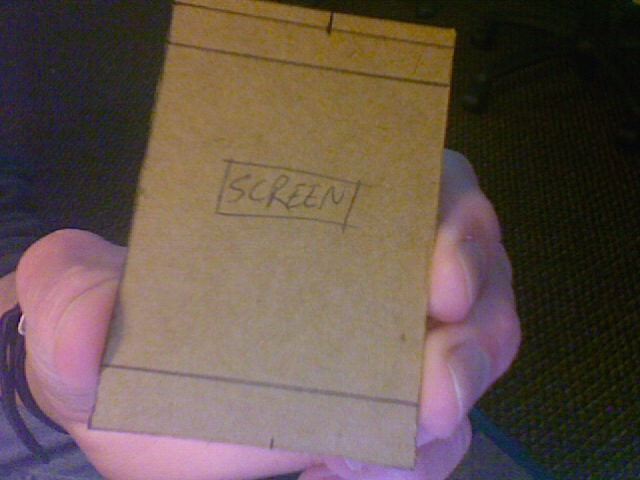
In my opinion, these are good tools for doing quick sketches, but it is important to do a paper prototype that is the exact size of the screen. Since I could not find any life-size iPhone templates, I made my own. It was inspired by the one shown in a promotional video for Cultured Code.
Theirs
Mine
Paper prototyping is a critical part of any development process. Any inconvenience it might provide you in the short term will ultimately save you time and help you to create a well-planned and easily used application.
The developer who produced the live video streaming iPhone application “Knocking™ live video” wrote an impassioned letter to Steve Jobs after the Pointy Heads, LLC-produced application was rejected. It was rejected for a very valid reason: it used a private API. This is a faux pas in most programming circles.
A private API in the iPhone SDK is an API that was included by Apple but is not supported officially in any way. The API was written and included mainly to assist Apple’s own internal development efforts, not those of third-party developers. Essentially, the Pointy Heads developers have built a tripod and one of the legs could disappear at any moment.
When one finds the “Knocking live video” application in the App Store, the ratings are less than confidence-inspiring. The average rating barely musters above one out of five stars. Many of the reviews simply state that the application did not work as advertised.
This only serves to emphasize the need for App Store reform. Excellent, experienced developers can have their applications rejected for arbitrary ridiculous reasons. However, if you are a mediocre developer but a good speech writer, then you stand a better chance of getting your app into the store right away.
In the Indiana University School of Informatics, the Media Arts and Sciences program seems to place a high level of emphasis on Flash and ActionScript development. This is extraordinarily frustrating for someone coming from a programming background.
 Flash has some fatal flaws that should exempt it from being so prominent on the web. However, like Internet Explorer 6, Flash is one of those things that can make life more difficult for a web developer.
System resource usage
Flash makes heavy use of the client machine’s processor. Every time I go to a web page with Flash in it, my MacBook’s fan cranks up higher than it goes in any other situation. There are benchmarks confirming this. Flash simply does not run efficiently on any platform
Proprietary standard
Open source advocates may howl at Flash’s closed architecture. In this case I would agree and at the same time, not care. Adobe has made it so that the only practical way to create a Flash program is with Adobe’s own proprietary and very costly software. There are alternative Flash players to Adobe’s Flash player. Still, the only way to develop Flash programs is through Adobe. If Adobe wants to create a high barrier to entry to their own product, then that is their call. However, Adobe has limited any video playback in Flash to its own .flv format and none other.
Usability
Flash, as a web tool, breaks several accessibility conventions. People with poor vision are essentially left out in the cold. Where screen readers can help a blind person get usable information from an HTML page, it is completely useless with a Flash object embedded in the page. By default, Flash does not have options to change things like saturation, brightness, or color. Flash just is not user-friendly for users of the web who cannot see well.
What the School of Informatics needs to do
I am certainly not advocating that the Media Arts and Sciences program completely abandon Flash. Like any other tool, Flash has its own purposes. However, I feel there is simply too much emphasis placed on it. I am only taking five MAS classes for a cognate and two, possibly three, of them will be heavily Flash classes, even with names like “Multimedia Design” and “Interactive Design.” The MAS program needs to stop teaching as though Adobe Creative Suite is the only way to touch the web.
Flash just is not suitable as a web standard. It uses too many system resources, prohibits open development, and leaves out a large portion of the web-using population. Until these things change drastically, Flash will be a limited tool with an ultimately limited future.
 Patrick Proctor was here
